Menu
Detailed Description
The Menu provides a menu widget for use in menu bars, context menus, and other popup menus. Context menus are usually invoked by some special keyboard key or by right-clicking, they can be executed with exec().
Separators are inserted with addSeparator(), submenus with addMenu(), and all other items are considered menu items.
MenuItem
The MenuItem class is a single item in a menu and typically used for displaying text and icon. A menu consists of a list of menu items. Menu items are added with the add() and insert() functions.
You clear a menu with clear() and remove individual items with remove().
Event
The click event is emitted when the user click the menu item.
The item execute event is emitted when any item in the menu is clicked.
// Listen for the click event of the menu item
const item = menu.addItem('Mesh');
item.bind('clicked', (event: ClickEvent): void => {
    //The item is clicked.
});
// Listen for the item execute event of the menu
menu.bind('itemExecuted', (event: ItemExecuteEvent): void => {
    event.item as MenuItem; //The menu item is clicked.
});
Example code
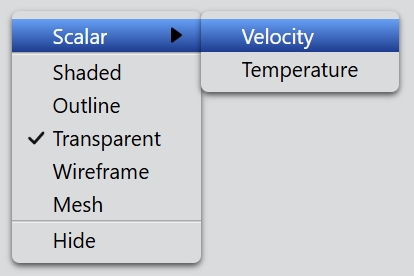
In the code below, you will create a menu:
const menu = new Menu();
const scalarMenu = menu.addMenu('Scalar');
scalarMenu.addItem('Velocity');
scalarMenu.addItem('Temperature');

menu.addSeparator();
menu.addItem('Shaded');
menu.addItem('Outline');
const item = menu.addItem('Transparent');
item.checked = true;
menu.addItem('Wireframe');
menu.addItem('Mesh');
menu.addSeparator();
menu.addItem('Hide');

menu.exec(new Point(100, 100));
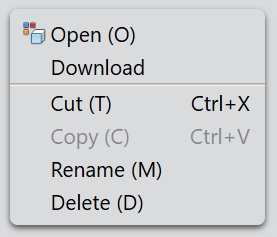
You can also add a icon to the menu item:
const menu = new Menu();
menu.width = 170;

menu.addItem('Open (O)', 'open_32.png');
menu.addItem('Download');
menu.addSeparator();
const cutItem = menu.addItem('Cut (T)');
cutItem.shortcutKey = 'Ctrl+X';
const copyItem = menu.addItem('Copy (C)');
copyItem.shortcutKey = 'Ctrl+V';
copyItem.enabled = false;
menu.addItem('Rename (M)');
menu.addItem('Delete (D)');

menu.exec(new Point(100, 100));